


-
-
May 7, 2021 at 2:40 pm #7639
stevland
KeymasterI’m afraid the sticky bar icons have to be white. That is a hard limitation of the design for now.
I’ll have to suggest that you make the sticky bar background darker, which of course you can do in Admin Panel > Theme > Color Theme.
I’m not sure how you got the refresh icon to show up as purple, I thought it was hard coded to be white. Custom CSS?
-
May 18, 2021 at 6:57 am #7661Mmomentum_itParticipant
Gotcha, alright, I just made the sticky bar darker.
Not sure, I don’t think my custom CSS affects the refresh icon:
/* Add your custom CSS code here.eg. p { color: red; }CSS tips: http://www.w3schools.com/css/css_syntax.aspEnd of comment */#footer #osticket a,
#footer #ostawesome a {
display: none !important;
}#header #nav a {
font-weight: bold !important;
}form[action="kb.php"] #basic_search .input.attached input, form[action="orgs.php"] .input.attached input, form[action="users.php"] .input.attached input, form[action="tasks.php"] .input.attached input, form[action="tickets.php"] .input.attached input {
background-color: #aaa;
color: #000;
}form[action="kb.php"] #basic_search .input.attached input:focus,
form[action="orgs.php"] .input.attached input:focus,
form[action="users.php"] .input.attached input:focus,
form[action="tasks.php"] .input.attached input:focus,
form[action="tickets.php"] .input.attached input:focus {
background-color: #999;
border-color: #ccc;
color: #000;
} -
May 18, 2021 at 6:58 am #7662Mmomentum_itParticipant
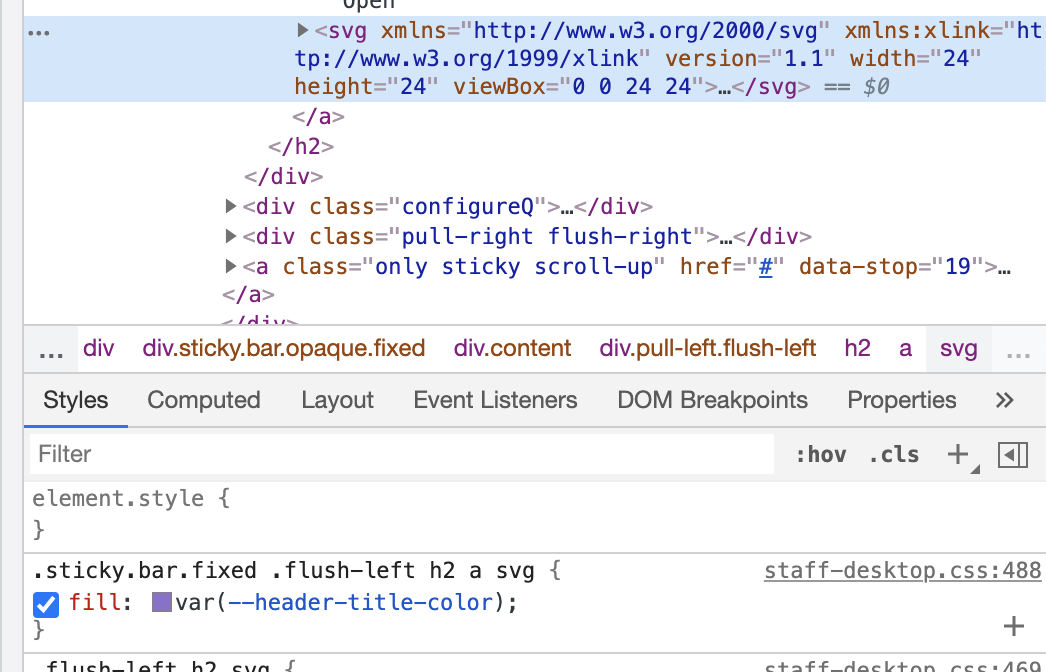
I think it just comes from the header title colour:
-
You must be logged in to reply to this topic.